-
Posted on: 07 Jan 2026
-
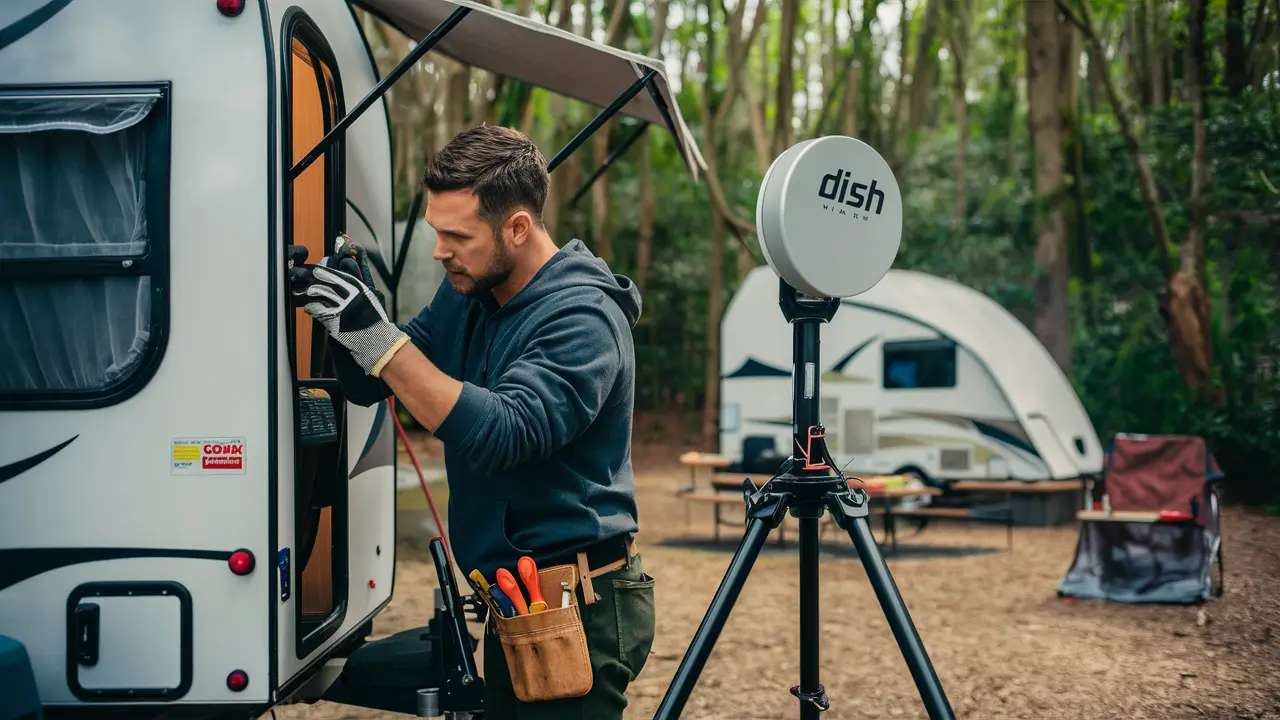
Discover the ultimate guide to connecting Dish Network to your camper. This comprehensive resource will walk you through every step, ensuring you enjoy satellite TV entertainment on your adventures without hassle. Get ready for crystal-clear channels wherever the road takes you.
Understanding Dish Network for RVs
Bringing the comfort and entertainment of satellite television to your recreational vehicle (RV) is a dream for many campers. Dish Network, a leading satellite TV provider in the United States, offers solutions tailored for mobile living. Unlike traditional home installations, setting up Dish Network in a camper involves unique considerations, primarily revolving around portability, power, and signal acquisition in diverse locations. The core concept remains the same: a satellite dish receives signals from Dish Network's orbiting satellites, which are then transmitted to a receiver inside your RV, decoding the signals into channels you can watch. However, the equipment and setup process are adapted for the mobile lifestyle. By understanding the fundamental differences between a stationary home setup and a mobile RV setup, you can better appreciate the technology and steps involved in successfully hooking up Dish Network to your camper. This guide aims to demystify the process, making it accessible even for those new to RV satellite systems.
The primary challenge for RVers is the need for a dish that can be easily deployed and repositioned to acquire a clear line of sight to the satellites. This contrasts with a fixed home dish that is permanently mounted and aligned. Furthermore, RVers often operate off-grid, necessitating power management solutions for their equipment. Dish Network recognizes this market and provides specific equipment and service plans designed to meet the demands of RV enthusiasts. In 2025-26, the landscape of RV satellite entertainment continues to evolve, with advancements in automatic dish technology and more flexible service options. This section will lay the groundwork for understanding why Dish Network is a viable and popular choice for RVers seeking reliable satellite TV service on the go.
Why Choose Dish Network for Your RV?
Dish Network has carved out a significant niche in the RV satellite market due to several key advantages. Firstly, their commitment to providing a broad range of channels, including popular sports, news, and entertainment networks, mirrors the offerings available to home subscribers. This means you don't have to compromise on your viewing preferences when you're out camping. Secondly, Dish Network offers specialized equipment designed for RV use. These portable or automatically deploying satellite dishes are built to withstand the rigors of travel and are engineered for quick setup and optimal signal reception. In 2025, Dish Network continues to be a strong contender, offering a robust network of satellites that provide extensive coverage across the continental United States. Their customer service is also generally well-regarded, which is crucial when troubleshooting issues on the road.
Moreover, Dish Network provides flexible subscription options that cater specifically to RVers. Unlike traditional cable or satellite providers that often require long-term contracts and are tied to a specific address, Dish Network allows for service to be paused and resumed, which is ideal for those who don't use their RV year-round. This flexibility is a major draw for seasonal campers or those who travel intermittently. The ability to relocate your service without penalty or extensive paperwork makes Dish Network a practical choice for a mobile lifestyle. As of 2025, the company continues to innovate, ensuring that their RV solutions remain competitive and user-friendly.
Dish Network Satellite Coverage for RVs
A critical factor for any satellite TV service is its coverage. Dish Network operates a constellation of satellites that provide service to the continental United States. For RVers, understanding this coverage is paramount. The primary satellites used for Dish Network service are located in geostationary orbit, meaning they appear stationary in the sky from a ground observer's perspective. Dish Network primarily uses satellites in the 72.7° West, 77° West, 110° West, 119° West, and 129° West orbital slots. The specific satellites your RV dish needs to connect to will depend on your geographical location within the US and the type of receiver and dish you are using.
In 2025-26, Dish Network's coverage is extensive, reaching most of the continental US. However, there can be instances of signal degradation or complete loss in certain remote areas, mountainous regions, or heavily forested locations where trees can obstruct the line of sight to the satellites. It's essential to check Dish Network's coverage maps for RV services, which are often available on their website or through authorized dealers. These maps typically indicate areas where service is optimal, marginal, or unavailable. For RVers, this means planning your routes and camping destinations with potential satellite reception in mind. Understanding the orbital positions of the satellites is also helpful, as it gives you a general idea of where to point your dish if you are using a manual setup. Most modern RV satellite systems are automatic, but knowing the basics can aid in troubleshooting.
Essential Dish Network RV Equipment
To successfully hook up Dish Network to your camper, you'll need a specific set of equipment designed for mobile use. This equipment differs significantly from what you would use for a permanent home installation. The core components include a satellite dish, a receiver (or set-top box), and the necessary cabling and accessories. The type of dish and receiver you choose will have a significant impact on the ease of setup, the channels you can receive, and the overall viewing experience. Investing in the right equipment upfront can save you considerable time and frustration on the road. In 2025, the market offers a range of options, from fully automated systems to more manual, budget-friendly solutions.
The Satellite Dish for RVs
The satellite dish is the most critical piece of equipment for receiving Dish Network signals. For RVs, there are two main types of satellite dishes: manual and automatic (also known as "auto-tracking" or "self-pointing").
- Manual Satellite Dishes: These are typically the more affordable option. With a manual dish, you will need to physically aim and lock onto the correct satellite(s) yourself. This often involves using a signal meter or an app on your smartphone to find the satellites. While they require more effort and a bit of a learning curve, manual dishes can be a great choice for budget-conscious RVers or those who plan to stay in one location for extended periods and don't mind the initial setup time. They are often smaller and lighter, making them easier to transport.
- Automatic Satellite Dishes: These are the more convenient and popular choice for most RVers. An automatic dish, once powered on, will automatically locate and lock onto the correct Dish Network satellites. This process typically takes just a few minutes. Automatic dishes come in two main forms: portable (which you can place on the ground near your RV and connect via cable) and roof-mounted (which are permanently installed on your RV's roof and deploy at the push of a button). Automatic dishes offer unparalleled ease of use, especially for those who frequently move their RV or prefer a quick and effortless setup. While more expensive, the convenience they offer is often well worth the investment for frequent travelers.
When selecting an RV satellite dish, consider factors like the number of satellites it can track simultaneously (some dishes can track multiple satellites for broader channel access), its durability, its power consumption, and its size and weight if portability is a concern. Brands like Winegard, King, and DirecTV (which uses similar technology and satellites for some services) are prominent in the RV satellite dish market. For Dish Network specifically, ensure the dish is compatible with Dish Network's satellite frequencies and orbital positions.
The Satellite Receiver (or Set-Top Box)
The satellite receiver is the device inside your RV that decodes the satellite signals and converts them into usable video and audio for your TV. For RV use, Dish Network offers specialized receivers that are designed for mobile environments and often have features optimized for RVing. These receivers are typically smaller and more energy-efficient than their home counterparts. You can get a receiver directly from Dish Network or purchase a compatible third-party receiver. It's crucial to ensure that the receiver is authorized by Dish Network for RV service. Some common Dish Network receivers suitable for RVs include models that support HD and even 4K viewing, depending on your subscription and TV capabilities.
When choosing a receiver, consider:
- HD/4K Capability: Ensure it supports High Definition (HD) or even 4K resolution if your TV is capable and you subscribe to HD/4K programming.
- Number of Tuners: Some receivers have multiple tuners, allowing you to record one channel while watching another, or watch different channels on different TVs simultaneously (if you have multiple TVs and the receiver supports it).
- Features: Look for features like DVR (Digital Video Recorder) capabilities if you want to record shows, and user-friendly interfaces.
- Power Consumption: For RVs, especially those operating off-grid, power consumption is a significant factor. Choose a receiver that is energy-efficient.
- Compatibility: Always confirm that the receiver is compatible with the specific Dish Network satellites and service plan you intend to use.
Dish Network often bundles receivers with their service plans, especially for new activations. However, if you are purchasing equipment separately or looking for an upgrade, ensure it's explicitly stated as compatible with Dish Network RV service.
Cables and Accessories
Beyond the dish and receiver, you'll need several other components to complete the setup:
- Coaxial Cables: You'll need high-quality RG6 coaxial cables to connect the satellite dish to the receiver. Ensure you have cables of sufficient length to reach from your dish's location to your RV's entertainment system. It's often recommended to use weather-resistant, outdoor-rated coaxial cables.
- Power Adapters: Your receiver will require a power source. Ensure you have the correct power adapter for your receiver that can be plugged into your RV's power system (AC or DC, depending on the receiver).
- Mounting Hardware: If you have a portable dish, you'll need a stable tripod or mount to set it up securely. For roof-mounted dishes, the mounting hardware is typically included with the unit.
- Signal Meter (for manual dishes): A satellite signal meter is essential for manually aligning your dish. These can range from simple audible meters to more sophisticated digital devices or smartphone apps.
- Splitters/Combiners (if applicable): In some complex setups, you might need splitters or combiners, but for a basic single-TV setup, these are usually not required.
- TV: Of course, you'll need a television set within your RV that is compatible with your receiver (e.g., has HDMI inputs for HD receivers).
Having all these components ready before you start the installation process will make "how to hook up Dish Network to camper" a much smoother experience.
Choosing the Right Dish Network RV Dish
Selecting the appropriate satellite dish is arguably the most crucial decision when setting up Dish Network for your RV. The market offers a variety of options, each with its pros and cons. Your choice will depend on your budget, how often you move your RV, your technical comfort level, and your desired viewing experience. In 2025, advancements in technology have made automatic dishes more accessible and reliable than ever before. Understanding the key features and differences between manual and automatic dishes, as well as different models within each category, will help you make an informed decision.
Manual vs. Automatic Dishes: A Deeper Dive
Let's break down the advantages and disadvantages of each type to help you decide:
Feature Manual Satellite Dish Automatic Satellite Dish Cost Generally lower initial cost. Significantly higher initial cost. Setup Time Can be time-consuming (15-45 minutes or more), requires learning curve. Quick and easy (typically 2-10 minutes), push-button operation. Ease of Use Requires manual aiming, understanding of satellite locations, and signal meter usage. User-friendly, minimal user input required. Portability Often lighter and more compact, easier to pack and move. Can be portable (requires setup on ground) or roof-mounted (permanent). Portable versions can be heavier. Reliability in Varied Conditions Can be difficult to re-acquire signal if moved frequently or in challenging terrain. Designed to automatically re-acquire signals, generally more robust in varied locations. Power Consumption Lower power consumption, as it doesn't have motors. Higher power consumption due to motors and tracking mechanisms. Target User Budget-conscious RVers, those who stay put for long periods, tech-savvy individuals. Frequent travelers, those prioritizing convenience, less tech-savvy individuals. For most RVers looking for a straightforward "how to hook up Dish Network to camper" experience with minimal fuss, an automatic dish is the preferred choice. However, if budget is a primary concern and you don't mind a bit of a challenge, a manual dish can still provide excellent service.
Popular Dish Network RV Dish Models (2025-26)
The market for RV satellite dishes is dominated by a few key manufacturers. When looking for Dish Network compatibility, always verify that the specific model supports Dish Network's satellite frequencies and orbital positions. Here are some popular types and brands to consider:
- Winegard: Winegard is a leading name in RV satellite technology. They offer a range of both manual and automatic dishes. Their automatic models, such as the Winegard Trav'ler series (e.g., SK-SWM3, SK-7000), are highly regarded for their reliability and ability to lock onto multiple satellites simultaneously, providing access to a full channel lineup. They also offer portable automatic dishes like the Winegard Pathway X2, which is a popular choice for its balance of portability and performance.
- King: King (formerly King Controls) also produces excellent RV satellite antennas. Their King Quest and King Tailgater series are well-known portable automatic dishes. The King Quest is designed to work with multiple satellite providers, including Dish Network, and is known for its ease of setup. The King Tailgater is another popular portable option that automatically finds satellites.
- DirecTV (for Dish Network compatibility): While DirecTV is a competitor, some of their older automatic satellite dishes might be compatible with Dish Network satellites, especially those that can track multiple orbital positions. However, it's crucial to confirm this compatibility with Dish Network or a reputable RV satellite dealer, as newer DirecTV dishes might be locked to their own system.
When purchasing, ensure the dish is advertised as "Dish Network compatible" or specifically mentions support for the Dish Network satellites (e.g., 110°, 119°, 129°). For 2025-26, look for models that support SWM (Single Wire Multiswitch) technology if your Dish Network receiver requires it, as this simplifies cabling.
Portable vs. Roof-Mounted Dishes
This is another key distinction within the automatic dish category:
- Portable Dishes: These dishes are designed to be set up on the ground near your RV and connected to the receiver via a coaxial cable. They offer flexibility as you can reposition them to find a clear sky view if your RV's location is obstructed. They are generally lighter and easier to store. However, they require setup and takedown each time you move. Examples include the Winegard Pathway X2 and King Quest.
- Roof-Mounted Dishes: These dishes are permanently installed on the roof of your RV. They deploy automatically at the push of a button from inside your RV. The advantage is extreme convenience – no outdoor setup required. They are always ready to go. The downside is that they are fixed, so if trees or other obstructions block the sky from your RV's roof, you might not get a signal. They are also more expensive and require professional installation. Examples include the Winegard Trav'ler series.
Your choice between portable and roof-mounted will depend on your travel habits and installation preferences. If you frequently camp in wooded areas or move your RV daily, a portable dish might be more practical. If you value ultimate convenience and camp in open areas, a roof-mounted dish is ideal.
Dish Network RV Receiver Options
Selecting the right satellite receiver is just as important as choosing the dish. The receiver is the brain of your satellite TV system, decoding the signals and providing the user interface for channel selection, programming guides, and other features. For RV use, Dish Network offers specific receivers designed to be compact, energy-efficient, and compatible with their mobile service plans. In 2025-26, the focus is on HD and increasingly on 4K capabilities, along with user-friendly interfaces.
Dish Network Authorized RV Receivers
It's crucial to use a receiver that is authorized by Dish Network for RV service. These receivers are programmed to work with Dish Network's satellite system and are often required to activate and maintain service, especially with their flexible RV plans. While you might find older receivers for sale online, ensure they are not tied to a residential account and can be activated for mobile use. Dish Network often provides specific models for RV customers, or they may allow you to use certain compatible residential receivers if they can be activated under an RV account.
Key features to look for in an RV receiver include:
- HD/4K Support: Ensure the receiver supports High Definition (HD) for a clear picture. If you have an HD or 4K TV and subscribe to HD/4K channels, this is essential.
- DVR Functionality: Many RVers appreciate the ability to record shows for later viewing, especially when traveling. Look for receivers with built-in DVR capabilities or support for external DVR devices.
- Single Wire (SWM) Compatibility: Many modern Dish Network dishes and receivers use SWM technology, which allows a single coaxial cable to carry signals from the dish to the receiver, simplifying installation. Ensure your dish and receiver are compatible with SWM if you opt for this setup.
- Energy Efficiency: For RVs, especially those that boondock (camp without hookups), power consumption is a critical factor. Look for receivers that are designed for low power usage.
- User Interface: A clean, intuitive interface makes navigating channels, programming guides, and settings much easier.
Dish Network's customer service or authorized dealers can provide the most up-to-date information on which receiver models are currently recommended and available for RV service activations in 2025-26.
Common Receiver Models and Considerations
While specific model numbers can change, Dish Network typically offers receivers that are a good fit for RVs. You might encounter models similar to these, or newer iterations:
- Dish Network Wally: This is a very popular and compact receiver designed specifically for RVs and portable satellite systems. It supports HD, has a user-friendly interface, and is generally energy-efficient. It's often bundled with portable satellite systems.
- Dish Network Joey: The Joey is a client receiver that works in conjunction with a primary Hopper receiver. While typically used in a multi-room home setup, some RVers might use a Hopper system with Joey clients if they have multiple TVs and a larger RV setup. However, for most single-RV setups, the Wally is more common and simpler.
- Dish Network Hopper Series (e.g., Hopper 3): While the Hopper is a powerful, feature-rich receiver designed for home use, some RVers with larger, more permanent setups might opt for a Hopper if they need advanced DVR capabilities and multi-room viewing. However, these are generally larger, consume more power, and are less suited for typical mobile RV installations compared to the Wally.
Important Note: Always verify that any receiver you purchase can be activated with a Dish Network RV account. Some residential receivers may not be eligible for activation on mobile plans.
Setting Up Your Receiver
Once you have your dish and receiver, the setup process is generally straightforward:
- Connect the Dish to the Receiver: Run a coaxial cable from the LNB (the component on the dish that receives signals) to the "Satellite In" or "LNB In" port on your receiver.
- Connect the Receiver to the TV: Use an HDMI cable to connect the receiver's HDMI output to an HDMI input on your television.
- Connect Power: Plug the receiver's power adapter into a suitable power outlet in your RV.
- Power On: Turn on your TV and then your receiver.
- Follow On-Screen Prompts: Your receiver will guide you through the initial setup, which typically includes language selection, and then it will attempt to communicate with the satellite dish.
If you are using an automatic dish, it will deploy and find the satellites during this process. If you are using a manual dish, you will need to aim it correctly before the receiver can establish a connection. The receiver will often display a signal strength meter to help you fine-tune the dish's position.
Step-by-Step Guide: How to Hook Up Dish Network to Camper
Now that you understand the equipment, let's walk through the practical steps of setting up Dish Network in your camper. This guide assumes you have all the necessary components: a compatible satellite dish (either portable or roof-mounted), an authorized Dish Network RV receiver, coaxial cables, and a TV. We'll cover both manual and automatic dish setups, highlighting the differences.
Step 1: Positioning Your RV and Dish
For Automatic Dishes (Portable or Roof-Mounted):
- RV Location: Park your RV in a location that offers a clear, unobstructed view of the southern sky. This is crucial for Dish Network satellites, which are generally located in southern orbital positions. Avoid parking under dense tree cover or near tall buildings that could block the signal.
- Dish Placement (Portable): If using a portable automatic dish, find a stable, level spot on the ground near your RV. Ensure there's enough space for the dish to deploy fully and for you to run the coaxial cable without tripping hazards.
- Dish Placement (Roof-Mounted): If you have a roof-mounted dish, ensure your RV is parked in a location with a clear southern sky view from its roof.
For Manual Dishes:
- RV Location: Same as above – a clear, unobstructed view of the southern sky is paramount.
- Dish Placement: Set up your manual dish on a stable tripod or mount on level ground. Ensure it's positioned so you can easily aim it towards the southern sky without interference from your RV or other objects.
Step 2: Connecting the Equipment
For Automatic Dishes:
- Dish to Receiver: Connect one end of your coaxial cable to the LNB output on your automatic satellite dish. Run the cable to your RV and connect the other end to the "Satellite In" or "LNB In" port on your Dish Network receiver (e.g., the Wally).
- Receiver to TV: Connect your receiver to your TV using an HDMI cable. Plug the HDMI cable into the HDMI OUT port on the receiver and the HDMI IN port on your TV.
- Power: Connect the receiver's power adapter to a suitable power source in your RV (e.g., a 12V outlet or an AC outlet via an inverter).
For Manual Dishes:
- Dish to Receiver: Connect one end of your coaxial cable to the LNB output on your manual satellite dish. Run the cable to your RV and connect the other end to the "Satellite In" or "LNB In" port on your Dish Network receiver.
- Receiver to TV: Connect your receiver to your TV using an HDMI cable.
- Power: Connect the receiver's power adapter to a suitable power source.
- Signal Meter Connection (Optional but Recommended): Some signal meters connect between the LNB and the receiver, while others have their own power source or draw power from the receiver. Follow the signal meter's instructions.
Step 3: Powering On and Initial Setup
For Automatic Dishes:
- Power On: Turn on your TV and then your Dish Network receiver.
- Dish Deployment: The automatic dish should begin to deploy and search for satellites. This process can take a few minutes. You will typically see status indicators on the dish itself or hear it moving.
- On-Screen Setup: Once the dish has acquired the satellites, your receiver will start its on-screen setup process. Follow the prompts on your TV screen. This usually involves selecting your language and confirming that the receiver has found the satellites.
- Channel Scan: The receiver will then perform a channel scan to identify all available channels.
For Manual Dishes:
- Power On: Turn on your TV and then your Dish Network receiver.
- On-Screen Setup: Follow the initial on-screen setup prompts for your receiver (language, etc.).
- Aiming the Dish: This is the most critical step for manual dishes.
- Using a Signal Meter: If you have a signal meter, it will indicate when you are pointing at the correct satellite. You'll need to slowly sweep the dish horizontally and vertically until the meter shows a strong signal.
- Using a Receiver's Signal Meter: Many receivers have a built-in signal meter that you can access through the menu. You'll need to slowly move the dish while watching the signal strength indicator on your TV screen. Aim for the highest possible signal strength.
- Using an App: Satellite finder apps on smartphones can help you determine the correct azimuth, elevation, and skew for your location.
- Locking the Dish: Once you find the strongest signal, securely tighten all the adjustment knobs on your dish mount to prevent it from moving.
- Channel Scan: After the dish is aimed correctly, your receiver should be able to acquire the signal. Proceed with the channel scan as prompted on your TV.
Step 4: Activation and Testing
Activation:
- If this is a new service, you will need to activate your account. This typically involves calling Dish Network customer service or activating online. You will need your account number and possibly the receiver's serial number. They will confirm your service address (which for RVs is often your home address or a general service location) and ensure your account is active for your RV receiver.
Testing:
- Once activation is complete and the channel scan is finished, browse through your channels to ensure everything is working correctly. Check for clear picture and sound.
- If you encounter issues, refer to the troubleshooting section. For automatic dishes, ensure they are still locked onto the satellites. For manual dishes, you may need to re-aim the dish if the signal is weak or intermittent.
This detailed process for "how to hook up Dish Network to camper" should guide you through a successful installation.
Troubleshooting Common Dish Network RV Issues
Even with the best setup, you might encounter issues when trying to hook up Dish Network to your camper. Fortunately, most problems are fixable with a systematic approach. In 2025-26, the common issues remain similar, often related to signal acquisition, equipment compatibility, or service activation. This section will help you diagnose and resolve the most frequent challenges RVers face.
No Signal or Weak Signal
This is the most common problem. Here's what to check:
- Line of Sight: The most frequent culprit is an obstructed view of the satellites. Ensure there are no trees, buildings, or other obstructions between your dish and the southern sky. Even a few leaves can degrade the signal.
- Dish Alignment (Manual Dishes): If you have a manual dish, it may have moved slightly, or it may not have been aimed precisely. Re-aim the dish, slowly sweeping it and watching the signal meter on your receiver or signal meter device. Aim for the highest possible signal strength.
- Dish Alignment (Automatic Dishes): For automatic dishes, ensure they have completed their search cycle and have successfully locked onto the satellites. If they are struggling, try powering them off and on again. Sometimes, a slight manual nudge (if the dish allows) can help it find the correct position, but this is rare.
- Cabling: Check all coaxial cable connections. Ensure they are securely tightened at both the dish and the receiver. Inspect cables for any damage, kinks, or cuts. A damaged cable can significantly reduce signal strength.
- Receiver Power: Ensure your receiver is powered on and functioning correctly.
- Dish Type and Compatibility: Verify that your dish is indeed compatible with Dish Network satellites and your specific receiver. Some dishes are designed for different satellite providers.
- Weather: Heavy rain, snow, or fog can temporarily degrade satellite signals. This is usually a temporary issue.
Receiver Not Powering On or Responding
If your receiver is completely unresponsive:
- Power Source: Check that the power adapter is securely plugged into both the receiver and the power outlet in your RV. Verify that the outlet is receiving power (e.g., check your RV's breaker panel or test the outlet with another device).
- Power Adapter: Ensure you are using the correct power adapter for your specific receiver model. Using the wrong adapter can damage the unit or prevent it from powering on.
- Receiver Fault: If all power connections are correct and the receiver still won't turn on, the receiver itself may be faulty and require replacement.
Channels Missing or Not Authorized
If you can get a signal but are missing channels or seeing "not authorized" messages:
- Account Activation: Ensure your Dish Network account is active and in good standing. Contact Dish Network customer service to confirm your service status, especially if you've recently activated or reactivated service for your RV.
- Receiver Authorization: Confirm that your receiver is authorized for your specific Dish Network RV service plan. Some receivers might be locked to residential accounts or specific packages.
- Channel Scan: Perform a full channel scan through your receiver's menu. Sometimes, channels are added or moved, and a rescan is necessary to update your channel list.
- Subscription Package: Verify that the channels you are trying to watch are included in your current Dish Network subscription package.
- Satellite Alignment (for specific channels): Some channels might be broadcast from different satellites. If you're missing specific channels, it could indicate that your dish is not properly aligned to receive signals from all necessary satellites. This is more common with dishes that can only track one satellite at a time.
Automatic Dish Not Deploying or Locking
If your automatic dish isn't working as expected:
- Power to the Dish: Ensure the dish is receiving power. This is usually supplied through the coaxial cable from the receiver or a separate power source.
- Obstructions: Even automatic dishes need a clear view. If the dish attempts to deploy but stops or struggles, it might be hitting an obstruction.
- Firmware/Software Issues: Like any electronic device, the dish's internal software might occasionally glitch. Power cycling the dish (disconnecting power for a minute) can sometimes resolve this.
- Mechanical Issues: The motors or gears within the dish might be damaged or jammed. This often requires professional inspection or repair.
- Receiver Communication: Ensure the receiver is communicating correctly with the dish. Check the cable connections between them.
Troubleshooting Tips for Manual Dishes
Manual dishes require more user intervention:
- Elevation Adjustment: Ensure the elevation angle is set correctly for your geographic location.
- Azimuth Adjustment: Slowly sweep the dish left and right while monitoring signal strength.
- Polarization (Skew): For some dishes and satellites, you may need to adjust the LNB's rotation (skew) for optimal signal.
- Reference Points: Use landmarks or compass bearings to help re-establish the correct direction if the dish is moved.
- Signal Meter Calibration: Ensure your signal meter is properly calibrated and functioning.
When troubleshooting "how to hook up Dish Network to camper," patience and a systematic approach are key. Always refer to the user manuals for your specific dish and receiver for detailed troubleshooting steps.
Dish Network RV Service Plans and Considerations
One of the most significant advantages of choosing Dish Network for your RV is the flexibility of their service plans. Unlike traditional satellite providers that often tie you to a specific address and long-term contracts, Dish Network offers options that are ideal for a mobile lifestyle. This flexibility allows you to activate, pause, and resume your service as needed, making it a practical choice for RVers who don't use their vehicle year-round or travel extensively. In 2025-26, these flexible plans continue to be a major selling point.
Flexible RV Service Plans
Dish Network's RV service plans are designed to accommodate the nomadic nature of RV travel. Key features typically include:
- No Long-Term Contracts: Most RV plans do not require a multi-year contract, giving you the freedom to cancel or change your service without hefty early termination fees.
- Pause and Resume Service: This is a crucial feature for RVers. You can pause your service when your RV is in storage or when you're not traveling, and then easily resume it when you hit the road. This prevents you from paying for service you're not using.
- Portability: Your service is tied to your receiver and account, not a physical address. This means you can take your equipment and service with you anywhere within Dish Network's coverage area.
- Dedicated RV Support: Dish Network often provides customer support specifically for RV customers, who understand the unique needs and challenges of mobile satellite TV setups.
When signing up, you'll typically need to provide a primary service address (often your home address) for billing and account purposes, but the service itself is mobile. You will also need to ensure your equipment (dish and receiver) is compatible with the RV service plan.
Choosing the Right Programming Package
Dish Network offers a variety of programming packages, ranging from basic local channels to comprehensive bundles with hundreds of channels, including premium movie channels and sports packages. When selecting a package for your RV, consider:
- Your Viewing Habits: What channels do you watch most frequently? Are you interested in sports, news, movies, or general entertainment?
- Coverage Area: While Dish Network has broad coverage, certain channels or specific local channels might have regional variations. Confirm that your desired channels are available in the areas you plan to travel.
- Bundles and Promotions: Dish Network often runs promotions or offers bundles that can provide good value. Inquire about any special offers for RV customers.
- International Channels: If you require channels in languages other than English, Dish Network offers various international channel packages.
As of 2025-26, Dish Network continues to offer packages like:
- America's Top 120, 200, 250: These tiered packages offer increasing numbers of channels, starting with essential networks and expanding to include more sports, movies, and specialized channels.
- Dish LATINO: Packages tailored for Spanish-speaking households.
- Premium Channels: Options to add HBO, Showtime, Cinemax, Starz, and sports packages like NFL RedZone or MLB Extra Innings.
It's always a good idea to discuss your specific needs with a Dish Network representative who specializes in RV services to find the package that best suits your travel and viewing preferences.
Installation and Activation Fees
When setting up Dish Network for your RV, be aware of potential fees:
- Equipment Costs: The primary cost will be for the satellite dish and receiver. These can be purchased outright or sometimes leased through Dish Network, though purchasing is often more cost-effective for RVers in the long run.
- Activation Fees: Dish Network may charge a one-time activation fee for new service. This fee can sometimes be waived as part of a promotional offer.
- Professional Installation: While many RVers opt for DIY installation, especially with portable systems, professional installation is an option, particularly for roof-mounted dishes. This will incur an additional labor charge. For DIY setups, ensure you have all the necessary tools and follow the instructions carefully.
Always clarify all costs and fees upfront with your Dish Network representative or authorized dealer to avoid any surprises.
Considerations for Boondocking and Power Usage
For RVers who frequently boondock (camp off-grid), power consumption is a critical concern. Satellite TV systems do consume power, primarily from the receiver and, for automatic dishes, from the motors used to track satellites.
- Receiver Power Consumption: Different receiver models have varying power draw. The Dish Network Wally, for instance, is designed to be relatively energy-efficient. Check the power specifications of any receiver you consider.
- Automatic Dish Power Consumption: Automatic dishes use motors to deploy and track satellites, which consumes more power than a stationary manual dish. However, once locked onto the satellites, their power draw is generally minimal.
- Power Management: If you boondock frequently, consider upgrading your RV's power system with larger batteries, solar panels, or a generator to supplement your power needs.
- Turning Off Equipment: Remember to turn off your receiver and, if applicable, your automatic dish when not in use to conserve power.
By understanding these service plan details and considerations, you can make the most of your Dish Network experience while on the road.
Optimizing Your Dish Network RV Setup
Once you've successfully hooked up Dish Network to your camper, there are several ways to optimize your setup for the best possible performance, convenience, and enjoyment. Optimization isn't just about getting a signal; it's about ensuring a reliable, clear, and hassle-free viewing experience throughout your travels. In 2025-26, with advanced technology, fine-tuning your setup can significantly enhance your RV entertainment.
Maximizing Signal Strength and Reliability
Consistent signal strength is the cornerstone of satellite TV. Here's how to ensure it:
- Know Your Satellites: Understand the general direction of the Dish Network satellites (south) and their orbital positions (e.g., 110°, 119°, 129° West). This knowledge is invaluable for troubleshooting and for manual dish alignment.
- Regular Cable Checks: Periodically inspect your coaxial cables and connections. Weather can degrade connectors, and vibration from travel can loosen them. Ensure all connections are snug and free from corrosion.
- Use High-Quality Cables: Invest in good quality RG6 coaxial cables designed for outdoor use. Cheaper, lower-quality cables can lead to signal loss.
- Minimize Cable Length: While you need sufficient length, avoid excessively long cables if possible, as they can contribute to signal degradation.
- Proper Dish Mounting: For portable dishes, ensure the tripod or mount is stable and level. A wobbly dish will struggle to maintain a lock on the satellites. For roof-mounted dishes, ensure the installation is secure and the dish is not damaged.
- Consider a Signal Finder App: Even with automatic dishes, a good satellite finder app on your smartphone can help you identify potential obstructions or verify the correct satellite direction if you're experiencing issues.
Improving Power Efficiency for Off-Grid Camping
For RVers who embrace boondocking, minimizing power consumption is crucial:
- Choose Energy-Efficient Receivers: As mentioned, models like the Dish Network Wally are designed for lower power draw. Research the power consumption (in watts) of different receivers before purchasing.
- Turn Off When Not in Use: Make it a habit to power off your receiver and satellite dish when you're not actively watching TV. This simple step can save significant battery power.
- Monitor Battery Levels: Keep a close eye on your RV's battery levels. Avoid running your satellite system when your batteries are critically low.
- Consider Solar Power: Investing in solar panels can significantly offset the power consumption of your satellite TV system, allowing for longer periods of off-grid use.
- Generator Use: If you have a generator, use it strategically to recharge your batteries, especially before extended periods of satellite TV use.
Integrating with Your RV's Entertainment System
A well-integrated entertainment system enhances the viewing experience:
- Multiple TVs: If your RV has multiple TVs, ensure your receiver setup supports this. Some receivers can output to multiple TVs, or you might need additional client receivers (like Dish Network Joeys, though these often require a primary Hopper receiver). Check the specifications of your receiver and dish system.
- Audio Systems: Connect your RV's soundbar or surround sound system to your TV or receiver for a more immersive audio experience. Ensure compatibility with HDMI ARC (Audio Return Channel) if your TV and sound system support it.
- Cable Management: Keep your cables organized and out of sight using cable ties, sleeves, or raceways. This not only looks tidier but also prevents tripping hazards and protects cables from damage.
- Smart TV Features: If your RV has a smart TV, you can leverage its Wi-Fi capabilities for streaming services when you have internet access, providing an alternative or supplement to satellite TV.
Maintenance and Care for Your Equipment
Proper maintenance extends the life of your satellite equipment:
- Clean the Dish: Keep the surface of your satellite dish clean. Dirt, dust, and bird droppings can slightly affect signal reception. Wipe it down periodically with a soft cloth and water. Avoid abrasive cleaners.
- Protect Cables: When traveling, ensure cables are stored properly to avoid kinks or damage. Use protective covers for connectors if exposed to the elements.
- Inspect for Damage: Regularly check your dish, receiver, and cables for any signs of physical damage, wear, or corrosion. Address any issues promptly.
- Software Updates: Keep your receiver's firmware updated. Dish Network often pushes updates remotely to improve performance and add features. Ensure your receiver is connected and has access to these updates.
- Storage: When your RV is in storage, consider disconnecting and storing sensitive electronic components like the receiver indoors to protect them from extreme temperatures or moisture.
By implementing these optimization strategies, you can ensure your Dish Network setup provides reliable and enjoyable entertainment throughout your RV adventures.
Conclusion
Hooking up Dish Network to your camper is a rewarding endeavor that significantly enhances your RVing experience, bringing familiar entertainment to even the most remote locations. We've navigated the essential equipment, from specialized dishes and receivers to the necessary cables, highlighting the convenience of automatic systems versus the cost-effectiveness of manual ones. Understanding the nuances of Dish Network's RV-specific service plans, with their invaluable pause and resume features, is key to managing costs and flexibility on the road. Furthermore, detailed troubleshooting steps empower you to overcome common signal or equipment issues, ensuring your viewing remains uninterrupted.
By carefully selecting your equipment, understanding the step-by-step installation process, and implementing optimization techniques for signal strength and power efficiency, you can achieve a robust and reliable satellite TV setup. Whether you're parked at a scenic national park or enjoying a quiet campsite, having access to your favorite channels adds a layer of comfort and entertainment to your journey. We encourage you to leverage this comprehensive guide to confidently connect your Dish Network system and elevate your next RV adventure with seamless satellite entertainment.